Introduction
A modern workspace requires more than just a laptop and a desk. Professionals, students, gamers, and content creators often rely on multiple devices, external monitors, storage drives, and accessories to complete their daily tasks efficiently. Managing all these devices with limited laptop ports can quickly become frustrating. This is where a 15 in 1 docking station becomes an essential addition to any setup.
A 15 in 1 docking station provides a centralized hub that connects multiple peripherals through a single cable. Instead of constantly plugging and unplugging different accessories, users can enjoy seamless connectivity while keeping their workspace organized and clutter-free. Whether you work from home, in an office, or travel frequently, investing in the right docking station can significantly improve productivity and convenience.
Why Workspace Organization Matters
An organized workspace contributes directly to better efficiency. Tangled cables, disconnected devices, and limited connectivity can interrupt workflow and reduce productivity. A clean desk allows users to focus on their tasks without unnecessary distractions.
Using a 15 in 1 docking station helps eliminate cable clutter by connecting multiple devices to one centralized hub. Everything from monitors to keyboards, printers, storage drives, and network cables can remain permanently connected, making it easier to start working within seconds.
A streamlined workspace also creates a more professional appearance while improving device management.
What Is a 15 in 1 Docking Station?
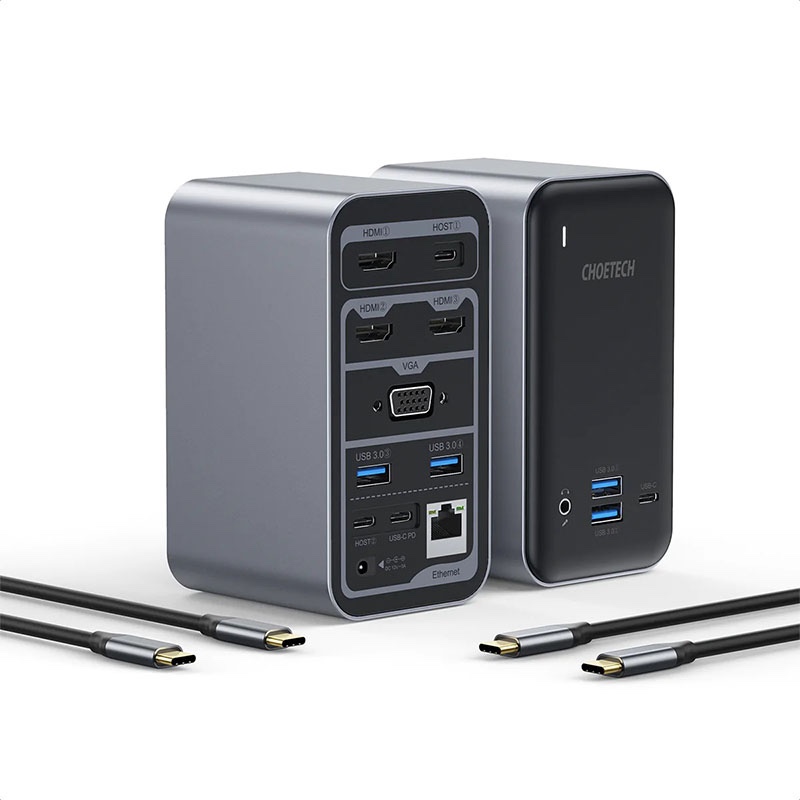
A 15 in 1 docking station is a multifunctional connectivity hub designed to expand the capabilities of laptops, tablets, and compatible devices. Instead of relying on the limited ports available on modern ultrabooks, users gain access to numerous connection options through one compact device.
Most models typically include:
Multiple USB Ports
Several USB-A and USB-C ports allow users to connect keyboards, mice, flash drives, webcams, and other accessories simultaneously.
HDMI Outputs
Dual or triple HDMI outputs support multiple external monitors for enhanced multitasking.
DisplayPort
Some models include DisplayPort connections for higher-resolution displays and professional monitor setups.
Ethernet Port
A wired internet connection provides faster and more stable networking than Wi-Fi, especially for remote work and online meetings.
SD and MicroSD Card Readers
Photographers, videographers, and designers can quickly transfer files from memory cards.
Audio Jack
A dedicated headphone and microphone connection improves communication during virtual meetings.
Power Delivery
Many docking stations provide charging support for laptops while simultaneously transferring data and video.
Increase Productivity with Multiple Displays
One of the biggest advantages of a 15 in 1 docking station is support for multiple monitors. Expanding your display area makes multitasking significantly easier.
Users can:
- Edit documents on one screen while researching on another.
- Monitor emails while attending virtual meetings.
- Manage spreadsheets alongside business dashboards.
- Edit videos with separate preview windows.
- Compare multiple documents simultaneously.
Instead of constantly switching between windows, multiple displays create a smoother and more efficient workflow.
Reduce Cable Clutter
Cable management is often overlooked but plays a major role in maintaining an organized workspace.
Without a docking station, users frequently connect:
- Charging cable
- HDMI cable
- USB keyboard
- Mouse receiver
- External SSD
- Ethernet cable
- Webcam
- Audio devices
A 15 in 1 docking station consolidates all these connections into one hub. Only a single cable connects the docking station to the laptop, making desks cleaner and easier to manage.
This simplified setup also reduces wear and tear on laptop ports.
Perfect for Remote Work
Remote work has become the standard for many professionals. Home offices require flexible yet reliable connectivity solutions.
A 15 in 1 docking station enables remote workers to create a professional workstation without permanently dedicating a desktop computer.
Benefits include:
Instant Workstation Setup
Connect one cable and instantly access all connected devices.
Stable Internet Connection
Ethernet connectivity ensures fewer interruptions during video conferences.
Improved Video Meetings
Dedicated webcam, microphone, speakers, and dual monitors create a more productive virtual meeting experience.
Easy Laptop Mobility
Disconnect a single cable when leaving the desk and reconnect instantly upon returning.
Ideal for Creative Professionals
Graphic designers, photographers, video editors, architects, and content creators often require numerous peripherals.
A 15 in 1 docking station supports demanding creative workflows by allowing simultaneous connections to:
- High-resolution monitors
- External SSDs
- Drawing tablets
- Memory card readers
- Studio speakers
- External hard drives
- Color calibration devices
With every accessory connected through one hub, creative professionals spend less time managing cables and more time creating.
Great for Business Offices
Businesses benefit greatly from standardized workstation setups.
Instead of configuring multiple cables every morning, employees simply connect their laptop to a 15 in 1 docking station and immediately gain access to:
Office Monitors
Large displays improve productivity for spreadsheets, presentations, and business software.
Shared Peripherals
Printers, scanners, keyboards, and conference equipment remain permanently connected.
Secure Networking
Ethernet provides reliable and secure internet access for corporate environments.
Faster Employee Setup
New employees can begin working quickly without extensive hardware configuration.
Enhance Laptop Performance
While a docking station does not directly increase processing power, it improves overall workflow efficiency.
Users spend less time:
- Searching for adapters
- Switching cables
- Reconnecting accessories
- Rearranging monitors
- Managing disconnected devices
A 15 in 1 docking station creates a smoother computing experience by keeping everything connected and ready to use.
Excellent for Students
Students frequently alternate between studying, online classes, presentations, and entertainment.
A 15 in 1 docking station provides flexibility by supporting:
- External monitors for research
- USB drives for assignments
- Wired internet during online exams
- External keyboards for comfortable typing
- Speakers for multimedia learning
The docking station transforms even a compact laptop into a complete study workstation.
Improve Gaming Setups
Many gamers also benefit from expanded connectivity.
A 15 in 1 docking station allows connections to:
- Gaming monitors
- Mechanical keyboards
- Gaming mice
- External storage
- Ethernet
- Streaming microphones
- Capture cards
With everything connected through one device, switching between work and gaming becomes effortless.
Features to Look for in a 15 in 1 Docking Station
Not every docking station offers the same capabilities. Before purchasing, consider these important features.
High-Speed Data Transfer
USB 3.2 or USB-C ports allow rapid file transfers for external storage devices.
Multiple Display Support
Choose a docking station that supports dual or triple monitor configurations if multitasking is important.
Power Delivery
Ensure sufficient charging capacity to power your laptop while connected.
Wide Compatibility
A quality 15 in 1 docking station should work with Windows, macOS, and many USB-C-compatible devices.
Durable Build Quality
Aluminum construction helps improve heat dissipation while increasing durability.
Gigabit Ethernet
Reliable wired networking is valuable for professionals and remote workers.
Easy Installation
Most docking stations require minimal setup.
The typical installation process includes:
- Connect the docking station to power.
- Attach monitors and peripherals.
- Connect the laptop using a USB-C cable.
- Install any required drivers if prompted.
- Begin using all connected devices immediately.
Many modern docking stations offer true plug-and-play functionality, making installation simple even for beginners.
Long-Term Value
Although purchasing a 15 in 1 docking station represents an upfront investment, it delivers long-term benefits.
Users experience:
- Greater productivity
- Reduced cable replacement
- Better workstation organization
- Improved multitasking
- Easier laptop transitions
- Enhanced device compatibility
- Cleaner desk layouts
Rather than purchasing multiple adapters individually, one docking station serves as a comprehensive connectivity solution.
Conclusion
A well-designed workspace can dramatically improve efficiency, comfort, and productivity. A 15 in 1 docking station simplifies daily computing by transforming a single laptop connection into a complete workstation with support for monitors, storage devices, networking, audio equipment, and numerous USB peripherals.
Whether you are working remotely, managing a busy office, creating digital content, studying for school, or building a powerful home setup, a 15 in 1 docking station offers the flexibility needed to support modern workflows. By reducing cable clutter, expanding connectivity, and enabling seamless multitasking, it becomes one of the most valuable accessories for maximizing your workspace and getting more done every day.